Two serious WordPress vulnerabilities in three weeks: what site owners should know
Contents
- Quick overview
- What should WordPress site owners do now?
- wp2shell and XSS2Shell: two different attack scenarios
- WordPress 7.0.3 fixed 12 security issues in total
- Why are vulnerabilities like these being found faster and faster?
- Was my WordPress site vulnerable to wp2shell or XSS2Shell?
- Is WordPress less secure now?
These were not just more bugs in some random plugin. In the summer of 2026, two serious attack chains were fixed in WordPress’s own core software within a short time. In both cases, the end result could have been code execution on the server.
On July 17, WordPress 7.0.2 was released with fixes for two security issues. Combined, these issues formed wp2shell, an attack chain that allowed remote code execution without a user account. The issue was serious enough that WordPress pushed forced automatic updates to affected sites. See the WordPress 7.0.2 security release.
Less than three weeks later, on August 6, WordPress 7.0.3 was released, this time with 12 security fixes. One of them was a login page vulnerability called “XSS2Shell”, which under the right conditions could also lead to code execution on the server. See the WordPress 7.0.3 security release.
Quick overview
July 17
WordPress 7.0.2 / wp2shell
The attack chain needed neither a WordPress account nor a vulnerable plugin.
August 6
WordPress 7.0.3 / XSS2Shell
In a targeted attack, a vulnerability on the login page could have led to a server takeover.
What to do
Update and check the site
Turn on automatic updates, check the version, and look for signs of compromise if needed.
What should WordPress site owners do now?
Right away
- Make sure the site runs WordPress 7.0.3 or later, or a patched version of its branch.
- Turn on automatic security updates for WordPress core.
- Check in the admin panel that the version has actually been updated.
Check
- If the site was vulnerable to wp2shell: unknown admin users, application passwords, new plugins, and unexpected PHP files.
wp-config.php,.htaccess, and the server logs.- That the website can actually be restored from a backup.
Going forward
- Don’t rely on security plugins alone. Core and plugin updates matter more.
- For business-critical websites, test major updates in a test environment first.
- Don’t check for security updates only once a month. Attacks start soon after a critical vulnerability becomes known.
If the site ran a vulnerable version for some time
Updating WordPress may not be enough on its own. A security update closes the vulnerability, but it does not undo a compromise that happened before the update. At a minimum, check administrator accounts, application passwords, changed plugins and files, the integrity of WordPress core, and, if possible, the server logs.
If no one regularly keeps an eye on your WordPress updates, vulnerabilities, and backups, take a look at our WordPress maintenance service.
wp2shell and XSS2Shell: two different attack scenarios
wp2shell: an attack without an account
- Prerequisite: no account or plugin needed
- User action: not required
- Result: remote code execution on the server
- Risk: very high
- Automation potential: high
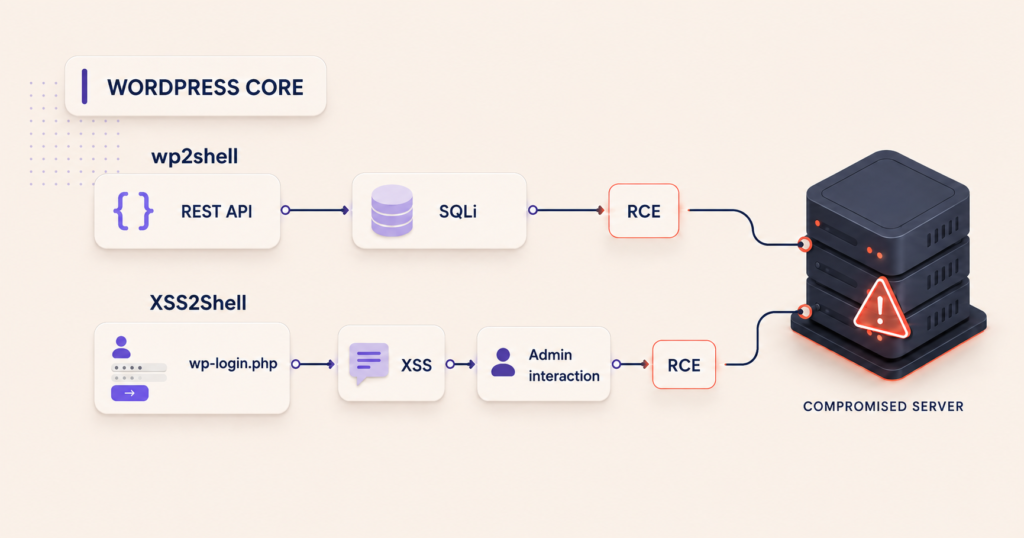
wp2shell combined two vulnerabilities in WordPress core. The main difference from XSS2Shell is that the attacker did not need any action from an administrator. According to Searchlight Cyber, the chain worked on a default installation with no plugins. Read the wp2shell analysis. Patchstack also confirmed real attack attempts after the fix was released. Read Patchstack’s analysis.
XSS2Shell: needs user interaction
- Prerequisite: access to the login page
- User action: required (for example, opening a specially crafted page)
- Result: server takeover in a targeted attack
- Risk: high, but more targeted
- Automation potential: limited, as it needs user interaction
XSS2Shell started on the login page. A full server takeover was not possible with a single anonymous request. According to the WordPress advisory, it required a chain that included social engineering. See the official advisory. A successful attack could be as damaging as wp2shell, but it is much harder to automate at scale.
WordPress 7.0.3 fixed 12 security issues in total
XSS2Shell got the most attention, but it was not the only issue fixed in version 7.0.3. The official WordPress security release lists the following fixes:
- Pre-auth reflected XSS on the login page that could lead to PHP code execution with a suitable payload, reported by the pwn.ai team (XSS2Shell).
- Contributor+ stored XSS in posts via the emoji settings element, reported by Asaf Mozes (amosec).
- Contributor+ stored XSS in the Post Content block, reported by N05ec@LZU.
- Contributor+ stored XSS in Quick Edit on high-traffic sites, reported by Naveen S and Ajmal Moochingal.
- Contributor+ stored XSS in the Post Date block, reported by Alex Concha of the WordPress security team.
- Privilege escalation in Multisite when users register on networks, reported by Aikido Security.
- Data leak of comments on password-protected posts via the Latest Comments block, reported by Ehtisham Siddiqui of the WordPress security team.
- Post slug enumeration, reported by HDWSec.
- Comment notes leaked in comment feeds, reported by Elio Gubser.
- Author+ CSS injection by bypassing the safe CSS attribute filter, reported by Anthropic.
- Email address verification bypass, reported by Omar Hasan.
- SSRF URL validation flaw that allowed requests to link-local address ranges, reported by Andrew Mohawk and several other reporters.
These vulnerabilities do not necessarily mean your website was compromised. What matters more for site owners is whether the version they run includes these fixes.
Why are vulnerabilities like these being found faster and faster?
In both cases, AI-assisted security research played a significant role.
Adam Kues, the Searchlight Cyber researcher who found wp2shell, used GPT-5.6 Sol Ultra with up to four AI agents to analyze the WordPress source code. By his account, the complete exploit was ready in just over ten hours, and he estimated the share of AI compute cost at about $25. Read the researcher’s own account.
That does not mean anyone can find a new WordPress vulnerability for $25. The researcher spent the following day working through the attack chain and reporting it to WordPress.
AI does not necessarily create more vulnerabilities. It makes it much faster to find existing ones and chain them together, and it shortens the time between a vulnerability becoming public and its exploitation at scale.
Patchstack has also described how AI has increased both the number of bugs found and the number of reports that need review. Read Patchstack’s overview.
So in WordPress security, it is not only updates that matter more and more, but also how quickly critical updates are installed.
Should you panic?
No, there is no need to panic. But you should not put off security updates for weeks. It depends on where you are now:
- WordPress has been updated. The risk is much lower. Continue with your regular maintenance.
- The updates have not been installed yet. Install them as soon as possible and check which WordPress version the site is actually running.
- There is already suspicious activity on the site. Updating alone is not enough. Check your logs, users, and files.
Updates are a normal part of WordPress maintenance. The problem starts when critical security patches are not installed, or when it is unclear whether a vulnerable version has already been exploited.
Was my WordPress site vulnerable to wp2shell or XSS2Shell?
The full wp2shell attack chain mainly affected WordPress versions 6.9.0–6.9.4 and 7.0.0–7.0.1. If a site ran one of these versions around July 17, 2026, and was reachable from the internet, check it for signs of compromise as well as updating the software.
XSS2Shell was fixed in WordPress 7.0.3, and the same fix was applied to older branches that still receive security updates. The risk depended more on whether administrators were logged in and could fall for targeted social engineering than on whether a bot could take over the site with a single request.
If you don’t know the exact version, or whether the forced automatic update succeeded, treat the site as potentially vulnerable until the version has been verified.
Is WordPress less secure now?
WordPress did not suddenly become more vulnerable overnight. What has changed is how fast vulnerabilities are found and exploited. wp2shell showed how far an anonymous attack can go. XSS2Shell showed that even a vulnerability on the login page can lead to a server takeover in a targeted attack.
The issue is not only how many vulnerabilities are found, but how little time passes between finding a vulnerability and exploiting it in practice. AI tools speed up the analysis of large codebases. This helps find and fix vulnerabilities sooner, but it also gives site owners less time to install a security patch. Waiting weeks for critical security updates is no longer a good idea.
Could your WordPress site be affected?
If your WordPress site has run an outdated version in recent weeks, or you are not sure security updates were installed on time, we can check your WordPress version, file integrity, administrator accounts, and any signs of compromise. The security check is part of our takeover audit (€290). If you continue with maintenance, the audit fee is deducted from your maintenance fees. On our maintenance plans, critical security updates are installed within 1–2 business days, and on the same day on the Partner plan.